SASSA Status Check Approved – Complete SRD R370 Guide With Pay Dates
You checked your SASSA status and it says Declined. You have no job. You have no income. You followed every step in the application. And the system still said no. If that is your situation right now, you are not alone. Every single month, hundreds of thousands of South Africans face the same thing. The missed payment. The blank pay date. The appeal that feels impossible to navigate. The fear that you are going to lose a grant that pays for food, electricity, or transport. I have helped people work through this system for years, and I want to be direct with you: most declined applications can be fixed.
This guide covers everything you need to know about the SASSA status check approved process for the SRD R370 grant in 2026. You will learn what each status message means, how to appeal a declined application step by step, what to do when your grant is approved but money has not arrived, and the full confirmed payment date schedule for all SASSA grants this year. Every fact in this article has been checked against official SASSA sources and is current as of May 2026.
What Is SASSA? And What Is the SRD Grant?
SASSA stands for the South African Social Security Agency. It is the government body responsible for managing and paying social grants in South Africa. The official website is sassa.gov.za.
The SRD grant stands for Social Relief of Distress. It was created in 2020 during the COVID-19 pandemic to help unemployed South Africans who had no income. It started at R350 per month. The grant increased to R370 per month in April 2024 and remains at R370 in 2026. More than 9 million people receive this grant every month.
The grant is temporary and reviewed every month. It is currently confirmed to run until 31 March 2027. After that, the government plans to move to a new Basic Income Support (BIS) grant, though details are still being finalised. If you are already approved, the extension applies automatically you do not need to reapply because of the extension.
📌 Key Terms Explained
SRD = Social Relief of Distress (the grant formerly called R350, now R370)
UIF = Unemployment Insurance Fund managed by the Department of Labour. If you receive UIF, you do not qualify for the SRD grant.
NSFAS = National Student Financial Aid Scheme. If you receive NSFAS, you do not qualify for the SRD grant.
ITSAA = Independent Tribunal for Social Assistance Appeals the body that decides your appeal.
How to Check Your SASSA SRD Status Online
Checking your SRD status is completely free. You do not need to visit a SASSA office. You only need your 13-digit ID number and the phone number you used when you first applied.
Other Ways to Check Your SASSA Status
|
Method |
How to Use |
Best For |
|---|---|---|
|
USSD Code |
Dial *134*7737# on your mobile phone |
No internet access, quick check |
|
|
Send “Hi” to 082 046 8553 |
Smartphone users, low data |
|
Moya App |
Download from your app store, use zero data |
Zero-rated data access |
|
Call Centre |
Call 0800 60 10 11 (free) |
Complex queries, no internet |
|
SASSA Office |
Visit with your ID document |
Identity issues, in-person help |
⚠️ Scam Warning Please Read
SASSA will never charge you money to check your status, process your application, or release a payment. Never share your OTP, PIN, SASSA card number, or banking details with anyone claiming to be from SASSA. Always use srd.sassa.gov.za only. Any other website asking for your ID or phone number is not official.
What Each SASSA Status Result Means
When you check your SRD status, you will see one of these results for each month. Each result is specific to that one month only it does not affect other months.
🔄 Approved (Appeal)
Your appeal was successful for that specific month. Payment will be processed for that month only.
⚙️ Reapplication Required
Your application has expired or lapsed. Go to srd.sassa.gov.za and start a new application.
ℹ️ Important to Understand
Each month is assessed on its own. Being declined in January does not mean February will be declined too. Being approved one month does not guarantee the next month. SASSA checks your bank account and records every single month before releasing payment.
Why Is My SASSA Application Declined?
Most declines happen for one of a small number of reasons. Understanding the reason helps you fix it correctly.
|
Decline Reason |
What It Means |
How to Fix It |
|---|---|---|
|
Identity Verification Failed |
Your details do not match the Home Affairs database |
Visit your nearest SASSA office with your original ID document to correct the mismatch |
|
Means / Income Source Identified |
SASSA’s SARS check found income or deposits above R624 in your account |
Appeal and provide bank statements showing the deposit was not regular income (e.g., a one-off family transfer) |
|
Alternative Income Source Identified |
UIF, NSFAS, or another income source was found |
If incorrect, appeal with proof. If your UIF has ended, provide documentation showing it is closed |
|
Self-Exclusionary Found |
The system flagged a potential grant, income, or UIF connection |
Appeal within 30 days with a sworn affidavit proving you have no current income or alternative grant |
|
Bank Account Validation Failed |
Your bank account details could not be verified by SASSA |
Log in at srd.sassa.gov.za and update your banking details account must be in your own name only |
|
Other Grant Detected |
You are already receiving a grant that disqualifies you (e.g., Disability, Old Age Pension) |
You cannot receive both the SRD grant and those grants at the same time. Note: Child Support Grant is allowed alongside SRD. |
|
Employed / SARS Record Found |
A SARS record suggests employment or business income |
Appeal with your most recent payslip or bank statements proving income below R624/month |
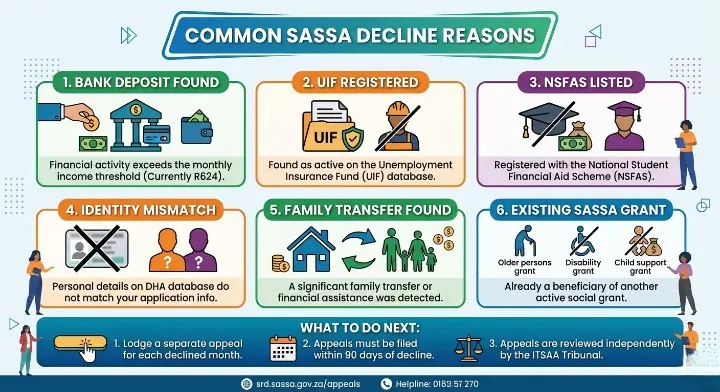
⚠️ Family Transfers Can Affect Your Grant
Even money sent to you by a family member counts as a deposit. If any single deposit in a month pushes your total bank inflows above R624, SASSA may decline your payment for that month. This is one of the most common and most frustrating reasons for a surprise decline.
Reconsideration vs Appeal – What Is the Difference?
Many people use these words interchangeably, but they are two separate steps. Knowing the difference can save you weeks of waiting.
|
|
Formal Appeal |
|---|---|
|
What it is |
First step asking SASSA to reassess its own decision |
|
Where to submit |
srd.sassa.gov.za click “Request Reconsideration” on your status page |
|
Time limit |
Within 90 days of the decline |
|
Cost |
Free |
|
Processing time |
A few weeks |
|
When to use it |
First attempt after any decline |
Start with Reconsideration First
Always try the reconsideration route first. It is faster. If SASSA reviews your case and still declines it, then submit a formal appeal to the Independent Tribunal. Both steps are on the same portal srd.sassa.gov.za.
How to Do a SASSA Status Check Appeal – Step by Step
If your SRD application was declined, this is how you appeal. It is free. You do not need a lawyer. You must file the appeal within 90 days of the decline date. After 90 days, that specific month’s decision is final and cannot be reversed.
⚠️ One Appeal Per Declined Month
You cannot appeal multiple declined months in one submission. Each declined month needs its own separate appeal. If you were declined in January, February, and March, you must submit three separate appeals.
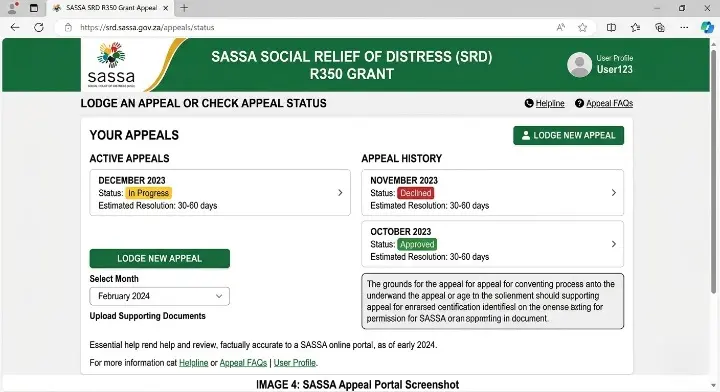
Submitting an Appeal by Phone
If you cannot access the portal, you can also appeal by calling 0800 60 10 11. After the chatbot instructions, press number 3 to lodge an appeal. A SASSA agent will verify your identity and take your appeal details. Have your ID number and the declined month ready before you call.
How Long Does the SASSA Appeal Take?
The Independent Tribunal targets a decision within 60 to 90 days from the date of submission. You will receive an SMS when the outcome is ready. Do not call SASSA every few days to check the high volume of appeals means delays are common. Check your status on the portal weekly instead.
What Happens If My Appeal Is Approved?
If approved, SASSA will process back payment for that specific month. The R370 for that month will be paid into your registered bank account or made available at your collection point. Approval for a past month does not automatically change results for other months each month is separate.
What Happens If My Appeal Is Also Declined?
That month’s decision is final. You cannot appeal again for the same month. However, a declined appeal has no effect on future months. Keep applying every month and make sure your details are accurate.
How to Check Your SASSA Appeal Status
After you submit an appeal, you can check its progress at any time. Here is how:
|
Appeal Status |
What It Means |
What to Do |
|---|---|---|
|
Pending / Under Review |
Your appeal has been received and the Tribunal is reviewing it |
Wait. Check again in 1 to 2 weeks. Allow up to 90 days total. |
|
Approved (Appeal) |
Your appeal was successful for that month |
Wait 2 to 3 working days for payment to process into your account |
|
Declined (Appeal) |
The Tribunal upheld the original decline |
Call 0800 60 10 11 for the specific reason. Continue applying monthly past declines do not affect future months. |
Approved But No Pay Date or No Payment What to Do
This is the issue most people ask about. Your status says Approved but either there is no pay date showing, or the date has passed and the money has not arrived. Here is what you need to know and what to do.
Why Approved Does Not Always Mean Instant Payment
Approval and payment are two separate steps in the SASSA system. Being approved means SASSA confirmed you qualify for that month. But the money still has to go through a payment batch process. A pay date is assigned after approval, and even then, the funds take 2 to 3 working days to reflect in your account after the pay date.
✅ Fix Guide – Approved But No Payment
Step 1 Find your pay date first
Go to srd.sassa.gov.za/sc19/status and check whether a pay date is shown next to your Approved status. If the date has not passed yet, simply wait for it.
Step 2 Pay date is blank or says “null”
A blank or null pay date means your payment batch has not been assigned yet. This is normal SASSA processes payments in batches throughout the month, not all at once. Keep checking every 3–4 days. If it stays blank for more than 3 weeks, call 0800 60 10 11.
Step 3 Check your banking details
If your pay date has passed and money has not arrived, the most common reason is a banking detail problem. Log in to srd.sassa.gov.za, go to “Update Banking Details,” and confirm everything is correct. The account must be in your own name only. SASSA will not pay into someone else’s account. If you update your details, allow 3–7 working days for SASSA to verify the new account.
Step 4 No bank account? Use retail collection
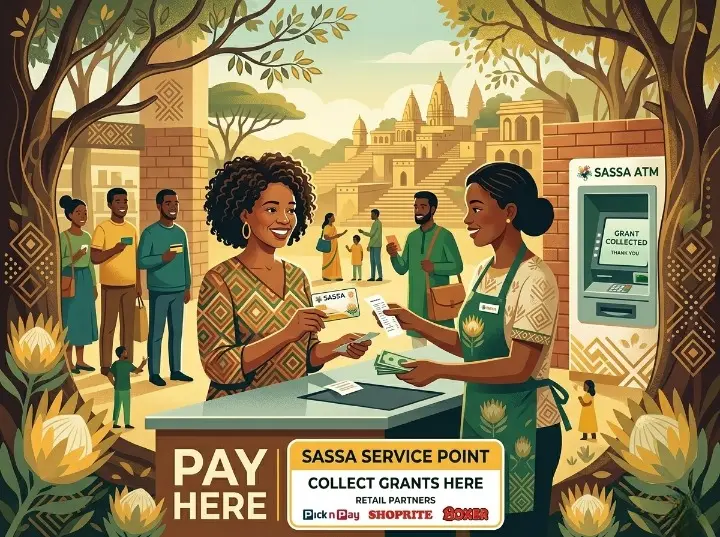
If you do not have a bank account, leave your banking details section blank when applying. You can collect your R370 in cash using your ID and cellphone number at selected retailers: Pick n Pay, Shoprite, Boxer, Checkers, or USave. A pay date will still be assigned you collect on or after that date.
Step 5 Post Office collection delays
If you collect via the Post Office and payment has not arrived, some branches run out of cash. Try visiting a different Post Office branch or call your nearest branch before travelling.
Step 6 Still no payment after 5 working days past your pay date
Call SASSA on 0800 60 10 11. Give them your ID number, the grant month, and the pay date shown on your status. They can investigate and escalate your case. You can also visit your nearest SASSA office with your ID document for in-person help.
SASSA Payment Dates 2026 All Grants
SASSA pays all permanent grants in the first few working days of each month. The order never changes: Older Persons first, then Disability, then Children’s grants. The SRD R370 is different it is paid separately, near the end of each month, on individual dates assigned per beneficiary.
How the Payment Order Works
SASSA staggers payments across three days on purpose. This reduces queues at ATMs, Post Office branches, and retailers. If a payment date falls on a weekend or public holiday, SASSA moves it to the previous working day.
|
Month |
Older Persons / War Veterans |
Disability / Care Dependency |
Children’s Grants |
SRD R370 |
|---|---|---|---|---|
|
January 2026 |
2 Jan |
5 Jan |
6 Jan |
Individual check portal |
|
February 2026 |
3 Feb |
4 Feb |
5 Feb |
20 to 25 Feb |
|
March 2026 |
3 Mar |
4 Mar |
5 Mar |
23 to 28 Mar |
|
April 2026 |
2 Apr |
7 Apr |
8 Apr |
23 to 30 Apr |
|
May 2026 |
5 May |
6 May |
7 May |
25 to 30 May |
|
June 2026 |
TBC check sassa.gov.za |
TBC |
TBC |
Individual check portal |
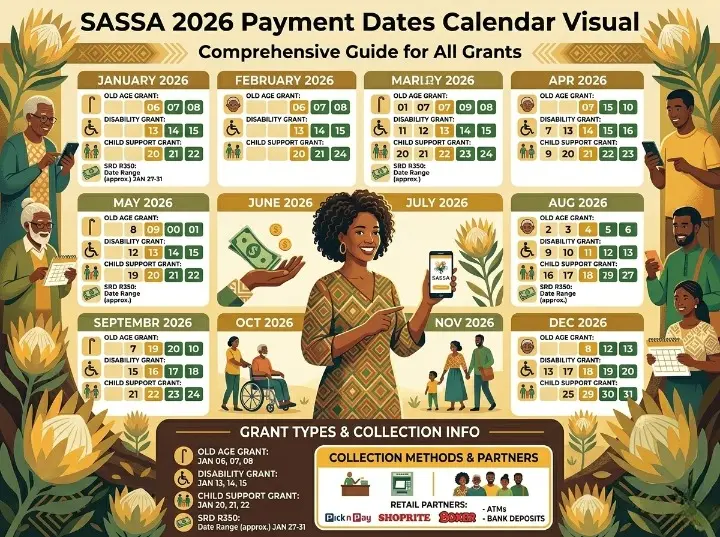
⚠️ April 2026 Disability and Children’s dates shifted due to Easter public holidays.
Grant Amounts From April 2026
|
Grant Type |
Amount From April 2026 |
|---|---|
|
Older Persons Grant (Old Age Pension) |
R2,400 per month |
|
Disability Grant |
R2,400 per month |
|
Care Dependency Grant |
R2,400 per month |
|
War Veterans Grant |
R2,420 per month |
|
Foster Child Grant |
R1,290 per month |
|
Child Support Grant |
R580 per month |
|
SRD R370 Grant |
R370 per month (no increase in April 2026) |
💡 SASSA Card Swap Deadline: 31 December 2026 If you still have the old yellow SASSA Gold Card, you must swap it for the new Postbank Black Card before 31 December 2026. After that, the old card stops working. Visit any Postbank branch with your South African ID. The swap is completely free. The new black card works at far more ATMs nationwide.
Can I Collect My R370 Without a Pay Date?
No. You cannot collect the SRD R370 grant until a confirmed pay date appears on your status page. If your status shows Approved but no date yet, the payment batch has not been processed. Keep checking your status. Your date will appear once the batch runs.
How to Apply for the SASSA SRD R370 Grant
If you have never applied, or your application has lapsed and you see “Reapplication Required,” here is how to start.
Who Can Apply?
- South African citizen, permanent resident, asylum seeker, or special permit holder
- Age between 18 and 59 years
- Monthly income below R624 per month from all sources
- Not receiving a Disability Grant, Old Age Pension, War Veterans Grant, or Care Dependency Grant
- Note: Child Support Grant recipients can still apply for the SRD grant
- Not currently receiving UIF benefits or NSFAS funding
- Not employed in formal or informal work earning above R624/month
How to Apply Online
How to Apply via WhatsApp
Save the number 082 046 8553 in your phone. Open WhatsApp and send the word “Hi” to start. Follow the automated menu. When prompted, type SRD to begin the application. Use your registered phone number for this it must match what you will enter in the application.
📌 Already Approved? You Do Not Need to Reapply: If you are already an approved SRD beneficiary, you do not need to reapply every month. SASSA reassesses your eligibility automatically each month using your bank and government records. Only reapply if you see “Reapplication Required” on your status page, or if you previously cancelled your application.
SASSA Contact Numbers and Official Links
🔗 Official SASSA Portals
|
Contact Method |
Details |
Use For |
|---|---|---|
|
Toll-Free Helpline |
0800 60 10 11 (free from any phone) |
Status queries, missed payments, appeal status, banking details |
|
|
082 046 8553 |
Applications, basic status check |
|
USSD |
*134*7737# |
Quick status check with no data |
|
|
GrantEnquiries@sassa.gov.za |
Written enquiries and follow-ups |
|
SRD Status Portal |
srd.sassa.gov.za/sc19/status |
Full status check with payment dates |
|
Appeal Portal |
srd.sassa.gov.za/appeals/appeal |
Submit and track your appeal |
|
SASSA Office |
Visit with your SA ID document |
Identity issues, biometric verification, complex cases |
Call centre hours: Monday to Friday, 8:00 AM to 4:00 PM. The line is toll-free from all mobile and landline phones.
FAQs
Conclusion
I have spent a long time helping people understand the SASSA system, and if there is one thing I can tell you from that experience, it is this: the grant is there for you. The declined status, the missing pay date, the appeal that feels like it goes nowhere these are problems most people can solve if they know the right steps. I have watched people who had been declined for months in a row finally get approved and back-paid, just by filing the right appeal with a clear explanation and the correct contact details on file. The system is not perfect, but it does respond when you use it correctly.
Do not give up after one decline. File the reconsideration first, then the appeal if needed. Keep your phone number and bank details updated. Check your status every week during the payment window. And always use srd.sassa.gov.za the official portal for everything. Your R370 is your right under South African law. If you found this guide helpful, share it with someone who needs it. And bookmark this page we update it every month as new SASSA information is confirmed.
If you want to read more guidelines about SASSA Status Visit This Blog.